Good multiplayer games on same wifi let a group of friends play together over one router, even when the broadband connection is down or the data pack has run out. The catch is that many games say “local” but still check in with an online server. This guide covers nine picks that suit Indian players, flags the ones that may need internet, and explains the hotspot and Bluetooth backups.
Table of Contents
How local Wi-Fi multiplayer actually works
In a true local game, one phone acts as the host and the others connect to it through the router. The data moves between devices inside your home network. It never needs to reach the internet, which is why a router with an expired broadband plan can still run a match.
Problems start when a game mixes local play with online services. Sign-in checks, cloud saves, Google Play Games lobbies and ad networks can all block a match when the router has no internet. The game may open fine and then hang on a loading screen or refuse to list nearby rooms.
That is the real dividing line between genuine multiplayer games on same wifi and games that only look local. The first kind keeps working through a broadband outage. The second kind quietly depends on a server somewhere else and fails the moment that link drops.
A simple no-internet check you can run
Before a trip, a hostel night or a power-cut evening on an inverter, test your favourites this way:
- Unplug the internet cable from your router, or switch off mobile data on the phone that will share a hotspot.
- Keep Wi-Fi on for every player and connect all devices to that same network.
- Open the game on the host phone and create a local or LAN room.
- Check whether the other phones can see and join the room within a minute.
- Play one full round. Some games only fail when they try to save results online.
If the room shows up and the round finishes, the game is genuinely local. If it stalls, it needs online services and belongs in your online list instead. Repeat the test after big updates, because a patch can add a new online check.
9 best multiplayer games on same wifi in 2026
These answer the most common question first: which Android games can be played on the same Wi-Fi? The first seven use a shared network. The last two are one-phone fallbacks for when nobody has a working connection at all.
1. Mini Militia Classic
The doodle-style shooter that filled Indian college hostels is back as Mini Militia Classic from Appsomniacs. Its store listing highlights the return of Wi-Fi LAN play, so one player hosts over the router or a hotspot and friends join from the local menu. Older guides cite up to 12 players on local Wi-Fi; treat that figure as approximate, and expect smoother matches with six or fewer on budget phones.
2. Among Us
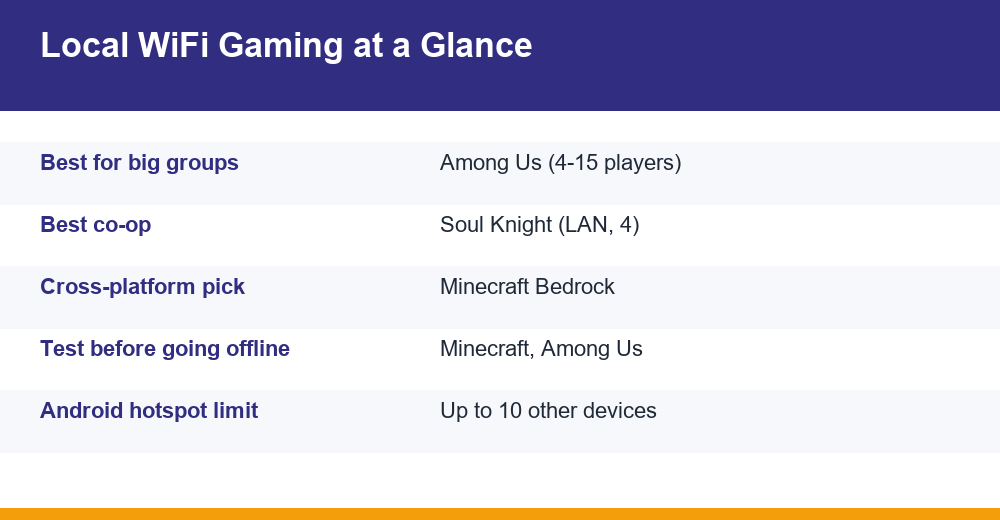
Innersloth’s social deduction hit has a dedicated Local option on the main screen. The publisher describes it as a 4 to 15 player game online or via local Wi-Fi. It works best for a big group in one room, where the arguments during meetings are half the fun. Our full Among Us guide covers roles, maps and tactics.
3. Minecraft (Bedrock Edition)
The mobile version of Minecraft can share a world with anyone on the same network once the host turns on LAN visibility. It is the best pick for building projects that last several sessions. The caveat: player reports suggest LAN joining can require a signed-in Microsoft account and an internet connection for verification, so test it before relying on it offline.
4. Terraria
The paid mobile version of Terraria supports local Wi-Fi multiplayer, with up to 8 players in a world including the host. Digging, fighting bosses and building bases together suits groups who want depth rather than quick rounds. Hosting on an older phone can lag, so let the most powerful device host.
5. Soul Knight
ChillyRoom’s pixel dungeon shooter supports LAN co-op for up to 4 players, alongside a separate online multiplayer mode added in later updates. Runs are short, weapons are chaotic, and it plays smoothly on budget phones. Choose the LAN option, not the online one, when the router has no internet.
6. BombSquad
BombSquad is a party game of explosive mini-games with up to 8 players over local and networked play. A neat trick: friends without the full game can install the free BombSquad Remote app and use their phones as controllers while one device runs the match. It is ideal when one person has a tablet or Android TV hooked up in the living room.
7. Pocket Pirates
An indie experiment from itch.io, Pocket Pirates runs a server on a Windows PC and lets phones join as players, with everyone on the same Wi-Fi network. It is a fun option for a living room with a laptop connected to the TV. Being a small indie project, it may lag behind mainstream games on updates, so check the page before a game night.
8. Ludo King (one-phone fallback)
Ludo King does not use a local Wi-Fi room, but its pass-and-play mode supports 2 to 6 players on a single device, and matches against the computer need no internet at all. For online rooms with relatives in other cities, see how to play Ludo King with friends.
9. Carrom Star (one-phone fallback)
Carrom Star’s Android listing describes an offline mode for playing with local players on one board. Pass the phone around the table and you have a quick carrom session with zero data. Note that the popular Miniclip Carrom Pool is mainly an online game, so do not count on it for offline nights.
Quick comparison: players, platforms, internet
Player counts below come from store listings and developer descriptions. Anything marked approximate could not be confirmed on an official page, and “test first” means the game has shown online checks in some builds.
| Game | Local players | Connection | Needs internet? | Price model |
|---|---|---|---|---|
| Mini Militia Classic | Up to ~12 (approx.) | Wi-Fi LAN / hotspot | No for LAN | Free, in-app purchases |
| Among Us | 4-15 | Local Wi-Fi | Test first | Free on mobile, ads/IAP |
| Minecraft Bedrock | Several on LAN | Same Wi-Fi | Possibly, for sign-in | Paid |
| Terraria | Up to 8 | Local Wi-Fi | No for local | Paid |
| Soul Knight | Up to 4 | LAN | No for LAN | Free, in-app purchases |
| BombSquad | Up to 8 | Local network | No for local | Free, in-app purchases |
| Pocket Pirates | Small groups | PC server + Wi-Fi | No | Indie (itch.io) |
| Ludo King | 2-6 | One device | No | Free, ads |
| Carrom Star | Local players | One device | No | Free, ads |
Read the table by situation. For a hostel room of ten wanting multiplayer games on same wifi, Among Us or Mini Militia Classic fit best. For two or three close friends who want a long session, Terraria or Soul Knight win. For a mixed family group, the one-device options avoid any setup at all.
If you mostly play alone during long train journeys, our list of the best offline games for Android covers single-player titles that also run without data.
Can you play Among Us on local Wi-Fi?
Yes. Among Us has a Local button on its home screen, separate from Online and Freeplay. The host taps Local and creates a game; everyone else taps Local and the room appears in their list of nearby games.
- Every device must be on the same router, not a guest network with a different name.
- All players need the same game version, so update everyone before you meet.
- Switch off any VPN on every phone, because it can hide local rooms.
- The host’s screen should stay on, since the match runs from that device.
Reports differ on whether recent builds still check Innersloth’s servers or account services before letting you into a local lobby. That is exactly why the no-internet test from the first section matters: run it once with your group’s phones before a trip.
For the best local session, keep the group to eight or ten players on a typical home router, set a short discussion timer, and seat the host near the router so the match does not stutter during tasks.
How to play Minecraft with friends on the same Wi-Fi
Minecraft on phones is the Bedrock Edition, and local worlds are shared through the Friends tab rather than a server address.
- Make sure every player has Minecraft Bedrock on the same version number.
- On the host phone, open Play, tap the edit icon next to the world and go to the Multiplayer settings.
- Turn on Multiplayer Game and Visible to LAN Players.
- Load the world and keep the host in it.
- On the other phones, open Play, go to the Friends tab and join the world listed under LAN games.
Two practical points. First, the world only exists while the host is playing, so if that person quits, everyone is kicked. Second, players generally need a Microsoft account, and some recent reports say LAN joining can need a live connection for verification. If your router has no internet, try a phone hotspot with a little data switched on.
Menu labels shift slightly between updates, so if you cannot find a toggle, look inside the world’s Edit screen rather than the main Settings menu.
Can Android and iPhone play together locally?
Sometimes. Cross-platform local play depends entirely on the game, and phone hardware matters much less than the game’s code.
- Minecraft Bedrock: yes. Android, iPhone, Windows and consoles share the same edition, so an iPhone can join an Android host’s LAN world on the same version.
- Among Us: online cross-play between Android and iPhone is standard. Local mixed-device rooms are less consistently reported, so test before a party.
- Mini Militia Classic: available on both stores with LAN modes, but mixed-platform local rooms are not clearly documented. Try it with your group first.
- Terraria: mobile versions are closely matched, though Android-to-iPhone local joins can depend on both phones running the same update.
The safest rule: update every device the same day and keep everyone on the latest store version. Version mismatch causes more failed cross-platform joins than anything else.
No router? Hotspot and Bluetooth fallbacks
You do not need a home router to play multiplayer games on same wifi. One phone can create the network for everyone else. Google’s official guide to sharing a connection by hotspot on Android explains the steps and notes that a Wi-Fi hotspot can serve up to 10 other devices.
Hotspot setup in a minute
- On the host phone, open Settings, then Network and internet, then Hotspot and tethering. Menu names vary by brand.
- Turn on the Wi-Fi hotspot and note its name and password.
- Connect the other phones to that hotspot.
- Switch off mobile data on the host if the game is truly local, so nobody burns through their daily data pack.
Keep the hotspot phone plugged in where possible, because hosting both the network and the game drains battery quickly. If a game needs a brief sign-in, leave mobile data on just long enough to load the lobby, then turn it off.
When Bluetooth makes sense
Some older and casual titles offer Bluetooth play for two players. It uses no internet and works where Wi-Fi is locked, such as trains or waiting rooms. The trade-off is short range and fewer players, so it suits chess, card or carrom-style games better than fast shooters. Check the store description for the word Bluetooth before you count on it.
Which multiplayer games work without internet at all?
Pass-and-play titles like Ludo King and Carrom Star need nothing but one phone. Terraria, Soul Knight, BombSquad and Mini Militia Classic run over local networks in their LAN modes. Minecraft and Among Us are the two worth testing before you go offline, since both can involve account or server checks.
Fixes when a local game will not show up
Most failures come down to a handful of network settings. Work through this list before deleting and reinstalling anything.
| Problem | Likely cause | Fix |
|---|---|---|
| Room not visible | Devices on different networks or bands | Join the same network name; avoid guest Wi-Fi |
| Joins then disconnects | Version mismatch | Update all phones from the store |
| Nothing found at all | VPN or private DNS active | Turn off VPN on every device |
| Stuck on loading | Game needs online check | Enable data briefly or use a hotspot with data |
| Lag in big groups | Weak host phone | Let the newest phone host and stay near the router |
Some routers also enable client isolation (sometimes called AP isolation), which stops devices on the same Wi-Fi from talking to each other. It is common on office, hotel and cafe networks. If your own router has it switched on, turning it off in the router settings usually solves invisible rooms.
Dual-band routers sometimes broadcast 2.4 GHz and 5 GHz under separate names. If one friend is on each band, rooms may not appear, so put everyone on the same network name.
Finally, restart the router and all phones if nothing else works. It sounds basic, but stale network connections are a frequent reason multiplayer games on same wifi refuse to list a host sitting right next to you.
Frequently Asked Questions
Which Android games can be played on the same Wi-Fi?
Strong multiplayer games on same wifi include Mini Militia Classic, Among Us, Minecraft Bedrock, Terraria, Soul Knight and BombSquad. Each has a local or LAN mode where one phone hosts and friends on the same router join. Terraria and Soul Knight are good for co-op, Among Us suits big groups of up to 15, and BombSquad lets extra phones act as controllers.
Which multiplayer games work without internet?
Terraria, Soul Knight, BombSquad and Mini Militia Classic work over a local network without internet in their LAN modes. Ludo King and Carrom Star offer pass-and-play on one phone with no connection at all. Minecraft and Among Us may still need an online check, so test them on a router without internet before a trip.
Can you play Among Us on local Wi-Fi?
Yes. Tap Local on the home screen to host, and friends on the same router tap Local to see your room. Everyone needs the same game version, and VPNs should be switched off. Because some builds may still check online services, run a quick test with no internet before relying on it during a power cut or journey.
Can Android and iPhone play together on local Wi-Fi?
It depends on the game. Minecraft Bedrock reliably lets Android and iPhone players share a LAN world when both run the same version. Among Us supports cross-play online, but local mixed-device rooms are less consistent. Update every phone on the same day, since mismatched versions are the most common reason cross-platform local joins fail.