Finding the best offline games for Android is harder than it looks, because plenty of “offline” games quietly demand a login, a data download or an ad server before they let you play. We switched every pick below to airplane mode after first setup and noted what still worked, how much storage it actually ate, and where ads or sign-ins got in the way.
Table of Contents
How We Tested the Best Offline Games for Android
Most listicles copy the Play Store description and stop there. That misses the real problems Indian players hit: a metro tunnel, a train journey through patchy coverage, or a prepaid pack that ran out before the month did.
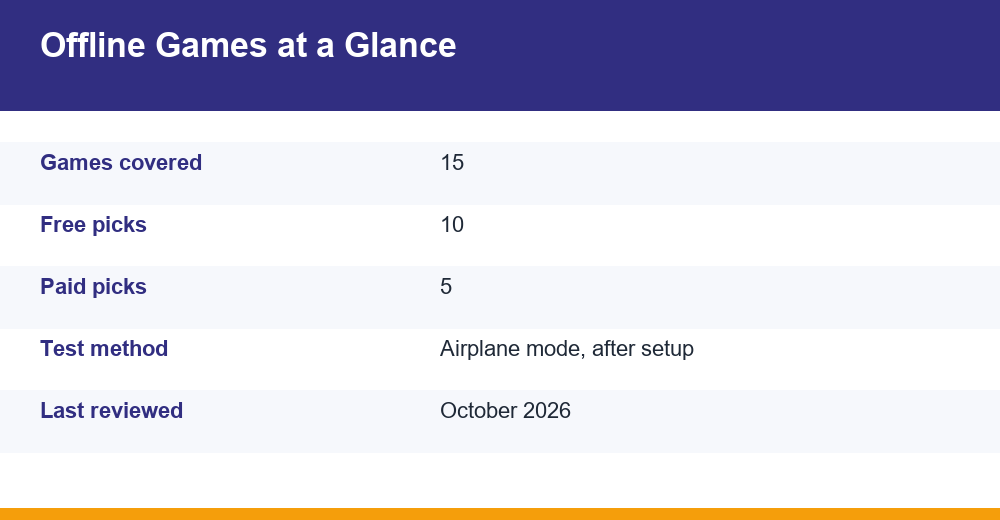
Our test was simple and repeatable. Each game was installed on Wi-Fi, opened once so it could finish any first-launch download, and then the phone was put in airplane mode. We then force-closed the game, relaunched it cold and played for at least 20 minutes.
- Pass: the core game loads and plays fully with no connection.
- Partial: the main mode works, but events, cloud saves, rewarded videos or online matches do not.
- Fail: the game blocks you at a login screen or a “check your connection” pop-up.
We also checked the installed size under Settings, not the download size on the store page. The two often differ, because many games pull extra asset packs after the first launch and keep growing with every update.
Sizes in this guide are rounded and approximate. They change by device, Android version and game version, so treat them as a guide rather than an exact figure.
What Is the Best Offline Game for Android?
If you want one answer, it depends on whether you will pay. For a free game, Hill Climb Racing is our top pick: it is fully playable without a connection, runs on old phones, and its physics-based driving never gets stale in short bursts.
If you are willing to pay once, Stardew Valley is the strongest choice among the best offline games for Android. It is a complete farming and life sim with dozens of hours of content, no ads, and no need to sign in to anything to play solo.
Here is how all fifteen picks compare on the things that actually matter offline:
| Game | Price | Approx. installed size | Offline result |
|---|---|---|---|
| Hill Climb Racing | Free (ads, IAP) | ~150-250 MB | Pass |
| Subway Surfers | Free (ads, IAP) | ~250-400 MB | Partial |
| Alto’s Odyssey | Free (ads, IAP) | ~200-350 MB | Pass |
| Shadow Fight 2 | Free (ads, IAP) | ~150-300 MB | Partial |
| Mini Militia | Free (ads, IAP) | ~80-150 MB | Pass (solo and local Wi-Fi) |
| Ludo King | Free (ads, IAP) | ~80-150 MB | Partial (vs computer, pass-and-play) |
| Crossy Road | Free (ads, IAP) | ~150-250 MB | Pass |
| Jetpack Joyride | Free (ads, IAP) | ~150-250 MB | Pass |
| Soul Knight | Free (ads, IAP) | ~300-500 MB | Pass (solo) |
| 2048 (minimal builds) | Free | Under 20 MB | Pass |
| Stardew Valley | Paid | ~250-400 MB | Pass |
| Minecraft | Paid | ~700 MB-1 GB+ | Pass (single-player) |
| Terraria | Paid | ~300-500 MB | Pass (single-player) |
| Dead Cells | Paid | ~1 GB+ | Pass |
| Slay the Spire | Paid | ~500 MB-1 GB | Pass |
Prices are shown simply as “Paid” because regional Play Store pricing in India changes with sales and currency adjustments. Check the store listing for today’s rupee price before buying.
Which Games Can I Play Without Internet for Free?
All ten games below cost nothing to download and keep their main mode working in airplane mode. Most are supported by ads and optional in-app purchases, which we cover in detail further down.
1. Hill Climb Racing
Fingersoft’s 2D driving game is a permanent fixture on Indian phones for good reason. You upgrade a jeep, bike or bus and push it as far as fuel and physics allow. Stages and upgrades all work offline, and our full Hill Climb Racing guide covers the best vehicle and upgrade order.
2. Subway Surfers
The classic endless runner. Runs, coins and characters you already own all work without data, but the rotating World Tour events and leaderboards need a connection. More on this in its own section below.
3. Alto’s Odyssey
A gorgeous sandboarding runner with a calming Zen Mode that has no scores or game-over screens. It plays perfectly offline and is one of the few free games that feels premium.
4. Shadow Fight 2
Nekki’s silhouette fighting game still has one of the best single-player campaigns on mobile. Story fights load offline, but some events and special modes need a connection. A paid Special Edition exists for players who want to skip ads.
5. Mini Militia – Doodle Army 2
A favourite from college hostels across India. Training and solo modes work offline, and local multiplayer runs over a phone’s Wi-Fi hotspot, so a group can play together with zero mobile data.
6. Ludo King
Online matches need data, of course, but the vs Computer mode and Pass-and-Play on a single phone work without a connection. That makes it a reliable family game on long train journeys.
7. Crossy Road
Hop across roads, rivers and rail lines in Hipster Whale’s blocky arcade game. Short runs, a huge character collection, and no connection needed to play.
8. Jetpack Joyride
Halfbrick’s side-scrolling runner remains a quick-fire time killer. The core game and missions work offline; only special events depend on data.
9. Soul Knight
A pixel-art roguelike shooter with hundreds of weapons. Solo dungeon runs work fully offline, and it also supports local multiplayer for friends on the same network.
10. 2048
The number-merging puzzle is tiny, endlessly replayable and needs nothing but your brain. Pick a minimal build from a trusted developer to avoid heavy ad libraries that bloat the install.
Paid Offline Games Worth Buying Once
Paid games are usually the cleanest offline experience. You buy once, there are typically no ads, and because the developer is not relying on ad revenue, nothing in the game needs to phone home before you can play.
11. Stardew Valley
ConcernedApe’s farming sim arrived on Android in 2019, with Chucklefish handling the mobile release. You build a farm, fish, mine and befriend a whole village. Solo play is fully offline and progress saves to the phone.
12. Minecraft
Survival and Creative single-player worlds work without a connection. The game may prompt you to sign in to a Microsoft account, but local worlds do not depend on it. Online servers, Realms and the Marketplace need data.
13. Terraria
A 2D sandbox with deep crafting, bosses and exploration. Single-player worlds are entirely offline, and it is lighter on storage and RAM than Minecraft.
14. Dead Cells
A fast, punishing action roguelite that has been well adapted to touch controls and also supports gamepads. It is one of the heavier installs here, so check free space first.
15. Slay the Spire
A deck-building roguelike where every run is different. Turn-based play makes it ideal for short commutes, and it runs with no connection at all.
Tip: if a paid game runs poorly on your phone, request a refund quickly through your Google Play order history. Refund windows are short, so do not wait days to test it.
Which Offline Games Are Under 100MB?
Storage is the real bottleneck on budget phones with 32GB or 64GB. Download size on the store page is often much smaller than what the game occupies after unpacking assets and caching data, so the installed size is the number to watch.
From our list, these are the games that can stay under or close to 100MB installed (approximate, varies by version):
- 2048 (minimal builds) – often well under 20MB.
- Mini Militia – small by modern standards, roughly around the 100MB mark.
- Ludo King – roughly around the 100MB mark, depending on version.
Most other free picks, including Hill Climb Racing and Subway Surfers, now sit above 100MB once installed. If you are running out of space, our guide to games for low-end phones lists lighter options that also run on 2GB to 3GB of RAM.
To see what is using space, Google’s official guide to freeing up storage on your Android device explains how to find storage usage and clear app cache. Menu names differ slightly between Samsung, Xiaomi, Realme and other brands, but the steps are similar.
- Open Settings and go to Apps (or Apps and notifications).
- Tap the game, then tap Storage or Storage and cache.
- Look at the total: app size plus user data plus cache.
- Clear cache if it has grown large; do not tap Clear storage unless you are happy to lose local progress.
When choosing between the best offline games for Android on a tight phone, compare that total figure, not the store’s download number.
Do Offline Games Still Show Ads?
Usually fewer, and sometimes none. Most ad networks need a live connection to fetch an ad, so in airplane mode many free games simply skip banner and interstitial ads. Some games cache an ad or two in advance, so you may still see a few at the start of a session.
The bigger catch is rewarded video ads. These are the optional videos you watch to revive, double coins or open a free chest. With no connection they cannot load, so those bonuses quietly disappear while you are offline.
- Banner and pop-up ads: mostly absent offline, occasionally shown from cache.
- Rewarded videos: unavailable offline, so revives and bonus rewards are lost.
- Ad-removal purchases: need a connection to buy, but stay active offline once bought.
- Paid games: typically no ads at all, online or offline.
One practical warning: a few free games show a full-screen “no connection” message instead of an ad. In our test that counted against them, because it interrupts play even though the game itself can technically run.
Is Subway Surfers Playable Offline?
Yes, for the part most people care about. Once the game has been opened online at least once and finished its initial download, normal runs work in airplane mode, and coins and keys you earn are saved locally on the phone.
What you lose offline:
- World Tour city events and seasonal content updates.
- Leaderboards and comparing scores with friends.
- Rewarded videos for revives and free rewards.
- Cloud sync of progress across devices until you reconnect.
SYBO has also released a separate spin-off, Subway Surfers City. It is a different app with its own progression, so check its store listing for offline support before relying on it for a trip. For tricks, character picks and high-score tips on the original, see our Subway Surfers guide.
Keep one thing in mind: progress made offline lives only on the phone until you connect again, so do not uninstall the game or clear its storage before it has synced.
Matching an Offline Game to Your Phone and Journey
A list of fifteen is only useful if you can narrow it down fast. The right pick depends on three things: how much free storage you have, how much RAM your phone has, and how long you will be without a signal.
| Situation | Best pick | Why it fits |
|---|---|---|
| 10-minute metro ride | Crossy Road or 2048 | Instant start, runs last a minute or two |
| Overnight train | Stardew Valley or Slay the Spire | Deep, slow-paced, saves anywhere |
| Phone with 2-3GB RAM | Hill Climb Racing or Mini Militia | Light 2D games that rarely stutter |
| Under 2GB free storage | 2048, Ludo King, Mini Militia | Smallest installs on this list |
| Playing with family, no data | Ludo King (Pass-and-Play) | One phone shared by several players |
| Friends in the same room | Mini Militia or Soul Knight | Local multiplayer over hotspot or Wi-Fi |
| Want a console-style game | Dead Cells or Terraria | Full premium games, no ads |
Battery matters as much as storage on long trips. Simple 2D games such as Hill Climb Racing and 2048 generally draw less power than 3D titles, so on a ten-hour journey with no charging point they are the safer choice.
Also think about save safety. Free games with cloud saves usually sync only when online, while paid games like Stardew Valley and Terraria store everything locally. If you switch phones often, back up local save files or use the game’s own cloud option before travelling.
Finally, be honest about why you want offline play. If it is only to dodge ads, a paid game is a better fix than switching off data, because rewarded bonuses vanish offline and the experience can feel stripped down. If it is about genuinely having no signal, any of the best offline games for Android above will serve you well once set up properly.
Tips to Keep Offline Games Working Reliably
A game that passes our test on day one can still fail on a journey if you skip a few basics. These habits keep the best offline games for Android ready when you actually need them.
- Launch once on Wi-Fi after every update. Updates often add asset packs that download on first launch, not from the Play Store.
- Pause game auto-updates before a trip if you are short on data, then update on home Wi-Fi.
- Test in airplane mode before you leave. Two minutes at home beats discovering a login wall on a train.
- Link a cloud save while online where the game offers it, so a lost phone does not wipe offline progress.
- Watch battery and heat. 3D games drain fast; lowering graphics and frame rate settings helps on long journeys.
- Install only from Google Play or the developer’s official site. Modified APKs promising “unlimited coins offline” are a common malware route.
These steps also prevent the most common complaint we hear from readers: a game that worked offline last month suddenly refusing to start after an overnight update.
Frequently Asked Questions
What is the best offline game for Android?
For free play, Hill Climb Racing is our top choice because it is fully playable without a connection, light on hardware and great for short sessions. If you will pay once, Stardew Valley offers dozens of hours of ad-free content, needs no sign-in for solo play and saves progress locally, making it the strongest overall offline pick.
Which games can I play without internet for free?
Hill Climb Racing, Alto’s Odyssey, Crossy Road, Jetpack Joyride, Soul Knight, Mini Militia and 2048 all play fully offline for free. Subway Surfers, Shadow Fight 2 and Ludo King also work, though events, online matches and rewarded videos need data. Open each game once on Wi-Fi first so it finishes downloading its assets.
Do offline games still show ads?
Usually far fewer. Most ad networks need internet to load an ad, so banners and pop-ups mostly vanish in airplane mode, although a few cached ads can appear. Rewarded videos for revives and bonus coins will not load offline at all, so those extras are unavailable until you reconnect. Paid games typically carry no ads.
Which offline games are under 100MB?
Among the best offline games for Android, minimal 2048 builds stay far under 100MB, while Mini Militia and Ludo King sit roughly around that mark depending on version. Most popular free games now exceed 100MB once installed. Always check the installed total in Settings, as it is often larger than the store’s download size.