Picking good games for low end phones is about matching each game to your RAM first, not just grabbing the most popular title. This guide sorts 12 games into 1GB, 2GB and 3GB tiers and gives the in-game settings to use for each one. It also leaves out the blocked and unreleased apps that still turn up in older Indian lists.
Table of Contents
Why RAM Tier Matters More Than the Phone’s Name
Two phones sold as “budget” can behave very differently in games. The thing that most often decides whether a game loads, stutters or crashes back to the home screen is usable RAM, meaning the memory left over after Android and its background services have taken their share.
A phone sold with 2GB of RAM often has well under 2GB free once it boots. That gap explains why a game that is said to run on 2GB can still close itself mid-match: the system runs short of memory and shuts down the largest app, which is usually your game.
Check what you actually have before you download anything:
- Open Settings and go to About phone to see installed RAM.
- On many phones, Settings > Battery or Device care also shows current memory use.
- If you can enable Developer options, the Memory or Running services screen shows average use over time.
- Compare the free figure with the game’s minimum, then leave some headroom.
The processor and graphics chip matter too, but on entry-level phones RAM is usually the first limit you hit. That is why the picks below are grouped by RAM rather than by genre alone.
One more clue is the Play Store itself. If a listing says your device is not compatible, or the Install button is missing, the developer has excluded your hardware or Android version. Sideloading the app from elsewhere rarely fixes that and adds security risk.
Best Games for Low End Phones, Sorted by RAM
The table below is a quick way to find games for low end phones that suit your device. “Comfortable tier” is our practical guide to the RAM where a game runs smoothly on low settings, not an official minimum. Download sizes change with each update, so check the Play Store listing before installing.
| Game | Genre | Comfortable tier | Online needed? | Price |
|---|---|---|---|---|
| Mini Militia – War.io | 2D shooter | 1GB | Optional (local Wi-Fi works) | Free |
| Ludo King | Board / party | 1GB | Optional | Free |
| Hill Climb Racing | Physics racing | 1GB | No | Free |
| Shadow Fight 2 | Fighting | 1GB | No for story | Free |
| Free Fire MAX | Battle royale | 2GB+ | Yes | Free |
| Subway Surfers | Endless runner | 2GB | No | Free |
| Soul Knight | Roguelike shooter | 2GB | No | Free |
| Stumble Guys | Party royale | 2GB | Yes | Free |
| Battlegrounds Mobile India | Battle royale | 3GB+ | Yes | Free |
| Clash Royale | Real-time strategy | 3GB | Yes | Free |
| Terraria | Sandbox | 3GB | No | Paid |
| Stardew Valley | Farming / RPG | 3GB | No | Paid |
What are the best lightweight games in India?
For most Indian players on entry-level phones, the lightest crowd favourites are Ludo King, Mini Militia and Hill Climb Racing. All three run on very modest hardware, suit short sessions and do not need a constant data connection. If you want an online battle royale, Free Fire MAX is the main legal option, but treat 2GB as its real floor.
If most of your play happens on trains or in places with patchy coverage, our list of the best offline games for Android has more titles that keep data use near zero.
1GB RAM Picks: Light Games That Still Feel Good
Phones with 1GB of RAM, including older Android Go devices, have very little room. Stick to 2D games or simple 3D games, and close every other app before you launch one.
1. Mini Militia – War.io
Miniclip’s side-scrolling shooter is still the go-to for local multiplayer. You can play friends over the same Wi-Fi network without using mobile data. Settings: keep graphics on the lowest option, play smaller matches and switch off background music if you notice frame drops.
2. Ludo King
Gametion’s board game is a household staple in India for a reason: it runs on almost anything and supports offline play against the computer or pass-and-play. Online rooms add some memory load, so close WhatsApp and the browser before starting a voice-chat game.
3. Hill Climb Racing
Fingersoft’s original physics racer (not the larger sequel) is one of the kindest games to weak hardware. It is fully playable offline, which also makes it a good pick for kids on a shared family phone.
4. Shadow Fight 2
Nekki’s silhouette fighter uses simple visuals that hide how good the combat is. The story mode works offline. Settings: lower the graphics option in the menu if animations stutter during fights, and keep notifications muted so pop-ups do not interrupt a combo.
At this tier, the biggest win is discipline rather than settings: one game open at a time, no music app in the background and a restart every day or two.
Which Games Run Smoothly on 2GB RAM?
With 2GB you can move up to proper 3D and online multiplayer, as long as you keep settings modest. This is the tier where the most games for low end phones live, and where settings choices make the biggest difference.
5. Free Fire MAX
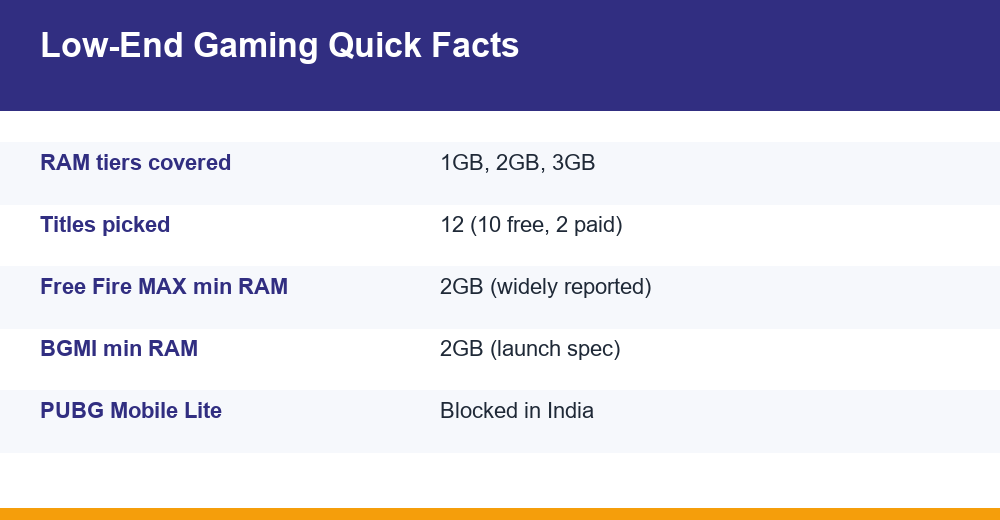
Garena’s battle royale is the official Free Fire experience in India, and 2GB of RAM is the minimum figure most commonly reported for it. Our full Free Fire MAX guide covers modes and updates; for weak phones, the settings below matter most.
- Graphics: Smooth (the lowest preset).
- Frame rate: Normal instead of High.
- Shadows and high-resolution options: off.
- Skip optional resource packs you do not need, to save storage.
6. Subway Surfers
SYBO’s runner works offline and in short bursts. The current build is noticeably bigger than versions from a few years ago, so a 2GB phone with little free storage may struggle more with space than with RAM. Restart the game after long sessions to keep it responsive.
7. Soul Knight
ChillyRoom’s pixel-art roguelike shooter gives you plenty of depth in a small package and plays fully offline. Settings: reduce screen shake and visual effects where the menu allows it, and choose a lower frame rate if your phone heats up.
8. Stumble Guys
This party knockout game is lighter than the battle royale shooters and works well for quick online rounds with friends. Use the lowest graphics setting and avoid joining on a weak connection, since network lag often looks like device lag.
If a 2GB phone still struggles with all four, check free storage before blaming RAM. A phone with less than a couple of gigabytes free tends to slow down across the board.
3GB RAM Picks: Room for Bigger Worlds
At 3GB you can try heavier online titles and larger sandbox games. Background apps are still the main enemy, but you now have room for a game and a messaging app open at once.
9. Battlegrounds Mobile India (BGMI)
KRAFTON’s launch requirements listed 2GB of RAM, but 2GB is really only good enough to get the game open. At 3GB the experience becomes much more stable. Settings: Smooth graphics, a lower frame rate, anti-aliasing off and auto-adjust graphics on.
10. Clash Royale
Supercell’s real-time card battler has short, three-minute matches and modest visuals. It needs a stable connection more than raw power. Close downloads and streaming apps before a ladder match.
11. Terraria
Re-Logic’s 2D sandbox is a paid game, but you buy it once with no ads. It runs well on modest phones, though very large worlds and busy boss fights can push older devices. Pick a small or medium world size on a 3GB phone.
12. Stardew Valley
ConcernedApe’s farming RPG is also paid and plays offline in single-player. It is light on graphics but keeps a lot of game state in memory as your farm grows. Save often and restart the game every so often during long sessions.
Paid games are worth a look on budget phones because they usually carry no ads, and ads themselves use memory and data. Check the Play Store refund window if you are unsure a game will run well.
Can a 1GB RAM Phone Run Free Fire MAX?
In practice, no, not reliably. The commonly reported minimum is 2GB of RAM, with more recommended for smooth play. A 1GB phone may not be offered the game on the Play Store at all. Even if it installs, expect very long load times, missing textures and crashes during matches.
There is no official lighter Free Fire build for India. Free Fire India was announced in 2023 and then postponed, so check Garena’s official channels rather than rumour sites for any news. Do not trust websites offering “Free Fire Lite” APKs, because they are not official.
On a 1GB phone, you are better off with these alternatives:
- Mini Militia for fast shooting with friends.
- Shadow Fight 2 for single-player action.
- Ludo King for relaxed online or offline games with family.
Is Storage or RAM More Important for Mobile Games?
RAM decides whether a game runs smoothly once it is open. Storage decides whether you can install and update it in the first place. On low-end phones both cause trouble, just in different ways.
| Symptom | Likely cause | What to do |
|---|---|---|
| Game closes mid-match | Not enough free RAM | Close background apps, lower settings |
| Update fails or stalls | Low free storage | Delete unused apps and old media |
| Long loading screens | Slow or nearly full storage | Keep some storage free |
| Stutter during fights | RAM plus GPU limits | Drop frame rate and effects |
| Phone feels slow everywhere | Storage almost full | Free up space, then restart |
Storage does affect speed: when internal storage is almost full, Android has less room for caches and temporary files, and everything slows down. As a rule of thumb, keep a few gigabytes free on top of the game’s own size, especially before big updates.
Google’s own guide to freeing up storage on Android explains the built-in tools for finding large files and unused apps. The Play Store can also archive apps you rarely use on supported devices, removing most of an app’s size while keeping your data for a later reinstall.
How to Make Games Run Faster on a Cheap Phone
Settings matter as much as the game you choose. These steps help with almost any of the games for low end phones listed above.
- Restart before playing. A fresh reboot clears memory that background apps have built up.
- Close or force-stop heavy apps such as social media, browsers and streaming apps.
- Lower in-game graphics first, then frame rate. A steady lower frame rate feels better than one that keeps jumping.
- Turn off battery saver while gaming if it throttles the processor, but keep the phone cool.
- Update the game and Android system when updates are available, since they can include fixes.
- Use Wi-Fi or a strong mobile signal for online games; network lag is often mistaken for device lag.
- Avoid “RAM cleaner” and “game booster” apps from unknown developers; many just add ads and use more memory.
Heat is a hidden problem on budget phones. When the chip gets hot it slows itself down, and frame rates drop. Take the case off during long sessions and avoid charging while you play.
For problems specific to online shooters, such as ping spikes or rubber-banding, see our step-by-step guide on how to reduce lag in mobile games.
Games and Downloads to Skip in India
Many older lists still recommend titles that Indian players cannot legally download. Skip these, along with any site that offers them as APK files.
- PUBG Mobile Lite: blocked in India since 2020 along with the main PUBG Mobile app. BGMI is the official replacement.
- Original Free Fire: blocked in India in 2022; use Free Fire MAX instead.
- Free Fire India: announced but not launched, so any download claiming to be it is fake.
- Modded or “unlocked” APKs of any game: they can carry malware and risk getting your account banned.
Rumours of a BGMI Lite for weaker phones come up regularly. Until KRAFTON lists such a version on Google Play, treat any download link elsewhere as fake.
Install games only from Google Play or the developer’s official site. Before you download, check the listing’s “About this game” section and recent reviews from people with phones like yours. That habit, more than any ranking, is how you find games for low end phones that actually suit your device.
Frequently Asked Questions
Which games run smoothly on 2GB RAM?
Subway Surfers, Soul Knight and Stumble Guys run comfortably on 2GB phones at low settings. Free Fire MAX also works, but 2GB is its reported minimum, so use the Smooth graphics preset, a Normal frame rate and no high-resolution options. Close background apps first, because usable RAM on a 2GB phone is usually well below the advertised figure.
Can a 1GB RAM phone run Free Fire MAX?
Not reliably. The commonly reported minimum is 2GB of RAM, so a 1GB phone may not see the game on the Play Store, and if it installs it is likely to crash or load very slowly. Mini Militia, Shadow Fight 2 and Ludo King are better choices for phones in this tier.
Is storage or RAM more important for mobile games?
RAM matters more for smooth gameplay, because it decides whether a game stays open and holds a steady frame rate. Storage decides whether you can install and update games, and a nearly full phone slows down overall. On budget devices, aim for enough RAM for the game plus a few gigabytes of free storage.
How do I make games run faster on a cheap phone?
Restart the phone before playing, close heavy background apps and set in-game graphics to the lowest preset with a modest frame rate. Keep some storage free, keep the phone cool and update both the game and Android. Avoid booster or cleaner apps from unknown developers, since they often use extra memory themselves.