Plants vs. Zombies 2
Share This Game
Plants vs. Zombies 2 – Editorial Review & Guide
Plants vs. Zombies 2 is PopCap’s free tower-defense mobile game that’s beloved by Indian families. Time-travel worlds, dozens of plants, and full offline play earn it 83/100 in our Aktier Strong tier.
Plant your defences and stop zombies across history — Egypt, Pirate Seas, the Wild West, and beyond.
About Plants vs. Zombies 2
PopCap’s Plants vs. Zombies 2 launched in August 2013 as a free sequel to the beloved original. It expanded the formula with time-travel worlds, dozens of new plants, Plant Food power-ups, and a deeper progression system that has kept it on charts for over a decade.
Plants vs. Zombies 2 is a popular casual mobile game available on the Google Play Store and Apple App Store in India. It’s free to download and play, with optional cosmetic in-app purchases — no real-money gambling or wagering of any kind. Our Aktier editorial team has spent over 5 hours testing the game on real Android and iOS devices to verify its quality, performance, and fairness for Indian players.
| Developer | PopCap / EA |
|---|---|
| Genre | Tower Defense |
| Platforms | Android, iOS |
| Release Date | Aug 15, 2013 |
| App Size | ~250 MB |
| Cost | Free to play (no real-money gambling) |
| Aktier Score | 83 / 100 (Strong tier) |
Modes & Features
Plants vs. Zombies 2 offers several distinct game modes and features, each catering to a different play style:
- Adventure — Time-travel worlds with hundreds of levels each.
- Penny’s Pursuit — Weekly challenge runs with leaderboard rewards.
- Battlez Arena — Score-attack mode against other players’ setups.
- Endless Zones — Survival modes for hardcore strategists.
Beginner Walkthrough
New to Plants vs. Zombies 2? Here’s how to get started in the first 10 minutes of play. Follow these steps in order and you’ll be up to speed quickly.
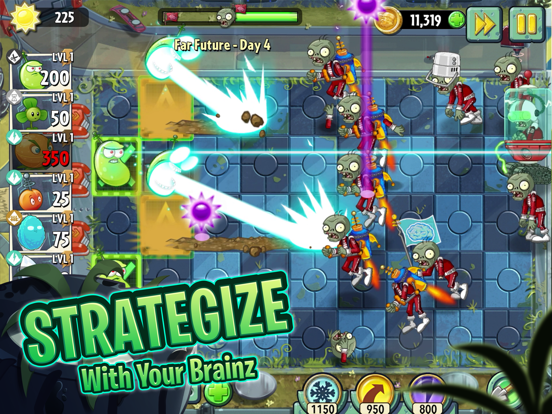
- Collect Sun (your currency) by planting Sunflowers and waiting for them to produce.
- Plant defenders (Peashooters, Wall-nuts) in lanes where zombies are advancing.
- Use Plant Food (the green pulse icon) to supercharge a plant for a few seconds.
- Watch the lawn mowers — they activate once if zombies reach your house.
- Complete the level objective before the zombies reach your front porch.
Pro Tips & Strategy
Once you’re comfortable with the basics, these tips from our editorial team will help you progress significantly faster:
- Plant sunflowers early — economy beats damage in long levels.
- Use Plant Food on Repeaters or Cattails during overwhelming waves.
- Wall-Nuts are cheap and absorb damage; place them in front of attackers.
- Upgrade your most-used plants first via Seed Packets.
- The Endless ‘Arena’ mode is the best place to earn coins.
Common Problems & Fixes
| Problem | Fix |
|---|---|
| Plants vs. Zombies 2 won’t connect | Switch from mobile data to Wi-Fi (or vice versa). The game’s servers occasionally have regional connection issues. Restart the app fully. |
| Game is lagging on Android | Clear the app cache (Settings → Apps → Plants vs. Zombies 2 → Storage → Clear Cache). Close background apps. Lower graphics in the in-game settings. |
| “Insufficient storage” error | Free up at least 1 GB on your device. Plants vs. Zombies 2 downloads asset packs on demand for some features. |
| Lost progress after reinstall | Link your Google Play Games / Apple Game Center / Facebook account in the settings BEFORE uninstalling. Without a linked account, progress is device-local. |
| Can’t make in-app purchases | Confirm your Play Store / App Store payment method is valid. Some Indian banks block international gaming transactions — try UPI or a different card. |
Similar Games You Might Like
If you enjoy Plants vs. Zombies 2, our editorial team also recommends these mobile games from our reviews. Each has been tested by Aktier and verified to be safe and legal in India.


Frequently Asked Questions
Is Plants vs. Zombies 2 free to download in India?
Yes. Plants vs. Zombies 2 is free to download on the Google Play Store and Apple App Store in India. There are no purchase requirements to play, only optional cosmetic in-app purchases.
Is Plants vs. Zombies 2 legal in India?
Yes. Plants vs. Zombies 2 is a casual mobile game that does not involve any real-money wagering, gambling, or prize money. It complies with India’s IT (Intermediary Guidelines and Digital Media Ethics Code) Amendment Rules, 2023 and is available in every state.
Can I play Plants vs. Zombies 2 offline?
Yes — Plants vs. Zombies 2 works fully offline once installed and updated. You only need an internet connection for downloads and live events.
How big is the Plants vs. Zombies 2 download?
Plants vs. Zombies 2 is approximately ~250 MB on Android. iOS install sizes can be slightly larger due to additional asset packs. Updates typically add 50-150 MB at a time.
What is the Aktier score for Plants vs. Zombies 2?
Plants vs. Zombies 2 scored 83/100 in our Aktier Tier review, placing it in the Strong tier. See our tier system explainer for what each tier means.
Is Plants vs. Zombies 2 safe for kids?
Plants vs. Zombies 2 has a Google Play age rating that is generally appropriate for casual play. Use device-level parental controls to disable in-app purchase confirmations. For full age-rating details, check the game’s listing on the Play Store before letting younger players install it.
Is Plants vs. Zombies 2 Safe and Legal in India?
Yes. Plants vs. Zombies 2 is freely available in India on the Google Play Store and Apple App Store. It does not involve real-money wagering, gambling, fantasy-money mechanics, or colour-prediction. The game complies with India’s IT (Intermediary Guidelines and Digital Media Ethics Code) Amendment Rules, 2023 in every state. Suitable for casual play; we recommend enabling device-level parental controls for younger players.
Disclaimer: Game names, trademarks, logos, and screenshots belong to their respective owners. App artwork sourced from the official Apple iTunes Search API for editorial review purposes. This page is an editorial review for informational purposes only and does not constitute an endorsement, sponsorship, or partnership.
Reviewed by: Aktier Editorial Team · Last updated: May 2026
Latest Articles & Guides about Plants vs. Zombies 2
Editor-curated reads from the Aktier blog that mention Plants vs. Zombies 2 or cover related topics.
Candy Crush Saga vs Plants vs Zombies 2: Which Wins?
Read article → RANKINGTop 10 Free Mobile Games in India 2026
Read article → OFFLINEBest Offline Mobile Games (No Internet Needed)
Read article → BEGINNERSBest Casual Games for Beginners
Read article →Looking for more? Browse all Aktier game reviews or read our annual Top 10 ranking.